
Introduction: The Magic of Freestanding Lace
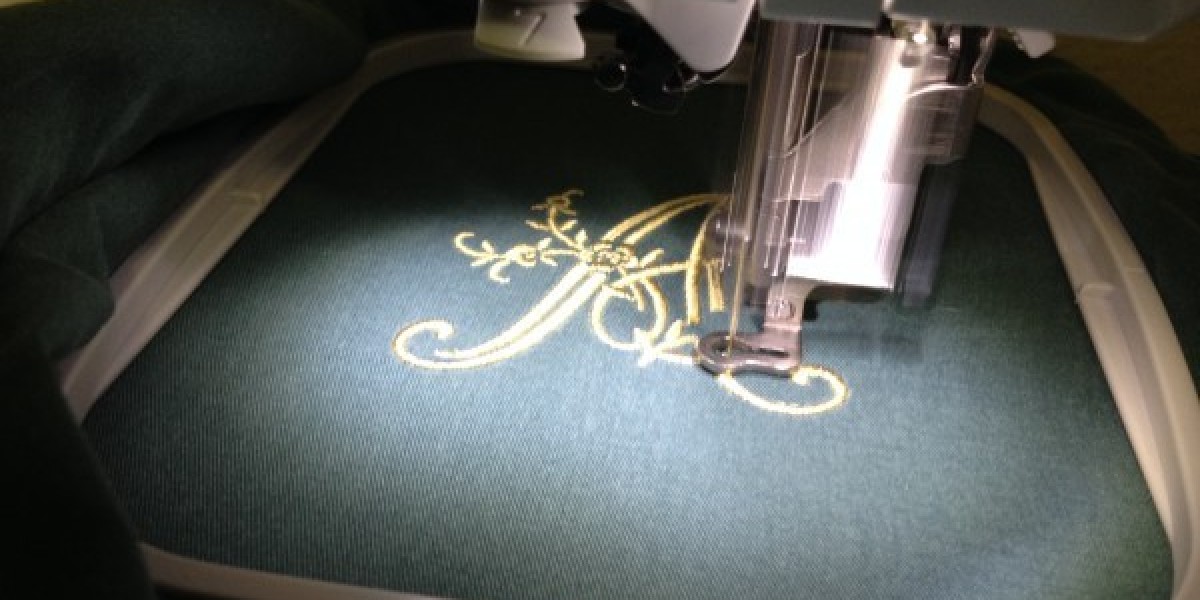
You have seen those beautiful lace ornaments, delicate bookmarks, and intricate jewelry pieces made entirely from thread. No fabric behind them. Just pure, structural embroidery standing on its own. That is freestanding lace, or FSL for short. And honestly, it feels like magic the first time you pull a completed design out of the water and watch the stabilizer dissolve away, leaving nothing but your stitches behind.
But here is the catch. You cannot just take any artwork and stitch it out on water-soluble stabilizer. Regular embroidery designs rely on fabric to hold everything together. FSL has no fabric. So the stitches themselves must form a self-supporting structure. That means you need to digitize FSL file for embroidery using very specific techniques. I will walk you through exactly how to do that, from understanding the basic principles to stitching out your first successful design.
What Exactly is Freestanding Lace (FSL)?
Let me start with a clear definition. Freestanding lace is embroidery stitched entirely onto water-soluble stabilizer . Once the stitching finishes, you soak the design in warm water, the stabilizer dissolves, and you are left with nothing but thread. The lace stands on its own because the stitches interlock and support each other .
Regular embroidery designs keep their shape because fabric backing holds them in place. With FSL, the thread itself becomes the fabric. That is why digitizing for FSL is fundamentally different from digitizing for standard embroidery. A design that works perfectly on a polo shirt will fall apart the moment you wash away the stabilizer .
FSL opens up incredible creative possibilities. You can make ornaments, jewelry, decorative trims, key chains, bookmarks, baskets, and even three-dimensional structures . The only limit is your imagination and your ability to digitize correctly.
Why FSL Digitizing is Different from Regular Embroidery
Let me highlight the key differences so you understand what we are up against.
In regular embroidery, you want to keep stitch counts low. Efficiency matters. The fabric provides most of the structural integrity. With FSL, the opposite is true. You actually need high stitch density because the threads must hold each other together . If you see spaces between your stitches after washing, your lace will fall apart.
Regular embroidery uses underlay primarily to stabilize fabric. FSL uses underlay and multiple layers to create the actual structure . You are essentially building a tiny suspension bridge out of thread. Every stitch has a job.
Regular borders can be relatively thin because fabric backing supports them. FSL borders must be thick satin stitches, usually 3mm or wider, to lock everything together . The border is what keeps the inner mesh from unraveling.
The Core Principles of FSL Digitizing
I want to give you the foundational rules before we get into the step-by-step. Master these, and your FSL designs will hold together every time.
Principle one, multiple layers with opposing stitch angles. You need at least two layers of stitching, and they should run in different directions . When one layer runs horizontally and another runs vertically, they lock together like a woven fabric. This crosshatch pattern creates the structural integrity that makes FSL possible.
Principle two, dense enough to hold, open enough to look like lace. This is a balancing act. Too dense, and your lace becomes stiff like cardboard. Too open, and it falls apart. Most FSL fills use spacing between 1.5mm and 2.5mm . At this density, the stitches overlap just enough to support each other while still looking airy and delicate.
Principle three, a strong satin border. The border is your frame. Without a thick, dense satin stitch around the entire perimeter, your inner fill will unravel from the edges . Set your satin border width to at least 2mm, preferably 3mm or more for larger designs.
Principle four, same thread top and bottom. Because FSL has no backing, both sides of the design are visible. Use the same thread color in your bobbin as on top . Some digitizers recommend using a slightly finer thread in the bobbin, like weight 60 instead of weight 40, to reduce bulk while maintaining color consistency .
Step-by-Step: How to Digitize an FSL Design from Artwork
I will walk you through the complete process using general principles that apply to most digitizing software. Whether you use Wilcom, Hatch, Embird, BERNINA software, or even Ink/Stitch, the concepts are the same.
Step 1: Prepare Your Artwork
Start with clean, simple line art. FSL works best with bold shapes and distinct outlines . Avoid shading, gradients, or sketchy lines. The software needs to see clear edges. High contrast between your design and the background helps the auto-trace or manual tracing process.
If your software struggles with JPEG or PNG images, convert your artwork to a monochrome bitmap . This removes any anti-aliasing blur and gives you clean edges to trace.
Scale your design to the final size before you digitize anything. Once you set your hoop size in the software, lock that size in. Scaling stitches after digitizing messes with density calculations and can create gaps in your lace mesh.
Step 2: Create the Foundation Mesh
The foundation of any FSL design is a fill stitch that creates a crosshatch pattern. In many digitizing programs, this means using a motif or pattern fill rather than a standard tatami fill .
Select your shape and choose a fill that produces a net or grid of intersecting lines. In Embird, Motif 15 creates this interlocking mesh . In Wilcom or Hatch, look for lace fill, net fill, or grid fill options. Set the spacing between 1.5mm and 2.5mm .
Set your stitch direction for this first layer. Pick an angle like 45 degrees. Then duplicate this fill layer, change the stitch angle to 135 degrees (perpendicular to the first), and keep the same spacing . These two layers will cross each other and lock together.
Remove any underlay for FSL fills. Standard underlay adds unnecessary density and can make your lace too stiff. You want the crosshatch layers themselves to form the structure .
Step 3: Add the Satin Border
This is the most critical step for structural integrity. Select the outline of your shape and convert it to a satin stitch .
Set your satin width to at least 2mm. For larger designs or designs that will get heavy use, go to 3mm or even 4mm . The border must overlap the edge of your fill mesh to capture and lock all those loose fill threads.
Adjust the satin density. You want the border tight enough to be solid but not so tight that it breaks needles. A spacing of around 0.4mm to 0.45mm works well for most FSL borders.
Add underlay to your satin border. An edge run plus a light zigzag gives the satin stitches something to grab onto . This underlay stays hidden under the top satin stitches but dramatically improves the border's hold.
Step 4: Fine-Tune Your Stitch Settings
Now go back and refine everything. For the fill layers, check your overlap. The two crosshatch layers should slightly overlap at the edges so they fully cover the design area. You can achieve this by adding a small amount of pull compensation or by extending your fill shapes slightly beyond the border line.
Check your travel paths. The machine should move from one section to the next without long jump stitches. Wherever possible, travel under existing stitches so the connecting threads get hidden inside the design . This also prevents loose threads on the back of your lace.
Set your start and end points strategically. You want to minimize jumps between color blocks. If you are using multiple colors, plan the sewing order so each new section starts close to where the previous section ended.
Step 5: Prepare for Your Test Stitch
Before you export your file, double a few things. Turn off automatic lock stitches for FSL. Too many stitches penetrating the same spot can break needles or damage the stabilizer . Only use lock stitches at the very end of the design.
Export your file in the correct format for your machine. PES for Brother and Babylock, JEF for Janome, DST for Tajima commercial machines . Keep your native working file (like .EMB or .EOF) so you can make adjustments later.
Setting Up Your Machine for FSL
Digitizing is only half the battle. You also need the right physical setup.
Use a heavyweight water-soluble stabilizer. Regular lightweight topper film will not support the dense stitching required for FSL . Look for products like Vilene, Badgemaster, or Sulky Ultra Solvy. These feel thick and robust, almost like a firm plastic sheet or a heavy interfacing.
For larger designs or designs with very dense stitching, use two layers of stabilizer . Double hooping gives you extra support and prevents the stabilizer from bouncing during stitching, which causes registration problems.
Hoop your stabilizer tight, like a drum skin. Tap it with your finger. It should feel firm and not sag . Any slack in the stabilizer leads to shifted stitches and messy lace.
Use a fresh needle. FSL creates dense stitching that generates heat and stress on the needle. A 75/11 sharp or topstitch needle works best . Ballpoint needles can push the stabilizer aside rather than piercing it cleanly.
Stitch at a moderate speed. 500 to 600 stitches per minute gives you good results . Slower speeds reduce the risk of thread breaks and allow the stabilizer to move smoothly under the needle.
Troubleshooting Common FSL Problems
Your lace falls apart after washing. This almost always means your fill density was too low or your satin border was too thin. Increase your mesh density to 1.5mm spacing or tighter, and widen your satin border to at least 3mm .
Your lace is stiff as cardboard. You set your density too high or used too many layers. Loosen your fill spacing to 2.5mm and try removing one of the crosshatch layers .
Your border looks wobbly or uneven. This happens when you digitized with too many nodes on your outline. Each extra node slows down the machine and creates a bump. Go back and simplify your outline. Fewer nodes mean smoother borders .
Your needles keep breaking. You are either using too high density, the wrong needle type, or your satin border width is too narrow for the stitch density. Try a fresh 75/11 sharp needle and loosen your satin density slightly .
Your design shifts during stitching. Your stabilizer is not hooped tight enough, or you need an extra layer. Re-hoop with more tension or add a second layer of water-soluble stabilizer.
Real Example: Digitizing a Simple Star Ornament
Let me walk you through a practical example. You want to make a star ornament for Christmas.
Start with a simple five-point star in line art. Clean edges, no shading. Import it into your software and set your hoop to 4x4 inches. Scale the star to fit nicely inside with room for the border.
Create your foundation. Use a motif fill with spacing at 2mm. Run one layer at 45 degrees. Duplicate it, run the duplicate at 135 degrees. No underlay.
Add your border. Convert the star outline to satin stitch. Set width to 3mm and density to 0.4mm spacing. Add an edge run underlay under the satin.
Add a hanging loop. Digitize a small half-circle at the top point of the star . Use a satin stitch with 3mm width for the loop itself. This gives you a way to hang your ornament after stitching.
Export as PES. Hoop two layers of heavyweight water-soluble stabilizer. Use matching thread top and bottom. Stitch it out. Soak in warm water. Rinse. Let it dry flat.
Your star should come out of the water holding its shape perfectly, with a solid border and a delicate but strong mesh interior.
Conclusion: Go Make Some Lace
Digitizing FSL is different from any other type of embroidery. You are not decorating fabric. You are building a structure entirely from thread. That means high density, multiple layers, opposing stitch angles, and thick satin borders.
Start simple. Pick a basic shape like a heart, a star, or a circle. Set up your two crosshatch fill layers at opposing angles. Add a 3mm satin border. Hoop heavyweight water soluble stabilizer. Use matching thread colors. Stitch it out and wash it away.
Your first attempt might need adjustments. That is normal. Play with the density settings. Try different mesh patterns. Experiment with border widths. Every adjustment teaches you something about how the stitches interact.
Once you master the basics, the possibilities are endless. Make ornaments for your tree. Create jewelry for gifts. Design custom patches that stand alone without any fabric backing. Stitch lace appliques to attach to garments. Build three-dimensional structures by layering and shaping your finished lace.
Now go digitize your first FSL design. Start with something small and simple. Watch it come together under the needle. Then dissolve that stabilizer and hold pure thread art in your hands. That feeling never gets old.